
How to stop coupon sites joining your affiliate program
To stop coupon sites joining your affiliate program, turn off auto-approval and check every applicant before you say yes. Then write a coupon rule into your terms, and give each affiliate their own limited code. The last step is to invite people who fit, so you need less screening.
What is a coupon site, and why does it cost you?
A coupon site lists discount codes for lots of shops. A shopper who's about to pay can search for a code, land on one, and use it.
An affiliate is someone who sends buyers to your shop for a cut of each sale. Say a coupon site joins as an affiliate. It can earn that cut on sales you'd have had anyway. You pay commission and get no new customers.
Three reviewers described parts of this in Shopify App Store reviews, all checked 22 October 2026:
- Coupon sites applying. "Out of the first five applicants, 3 were coupon or deal websites that appear to add no real value" (UpPromote reviews, 21 June 2026).
- Sites built only to rank in search. "collab applications are mostly SEO parasites." (Shopify Collabs reviews, 12 March 2026).
- Codes copied onto other sites. "I also think coupon scraping can happen regardless of which affiliate app you use." (GoAffPro reviews, 17 September 2026).
Three reviews don't prove how common this is. They do show the problem turns up in more than one app.
Not every brand bans them. In the Performance Marketing Association's 2025 Industry Study, loyalty sites held 35% of US affiliate spend in 2024, and coupon sites 10%. That's as quoted in a white paper from its coupons and deals council (PMA whitepaper, checked 22 October 2026). So plenty of brands pay them on purpose. The point is to choose, not to let them in by default.
Step 1: Turn off auto-approval
Auto-approval means anyone who fills in your form becomes an affiliate straight away. It's the main door coupon sites walk through.
Here's where each app keeps the switch, from each vendor's own help pages (checked 22 October 2026):
| App | Where to turn off auto-approval | Other screening tools it documents |
|---|---|---|
| UpPromote | Leave "Auto-activate affiliates" off. New sign-ups then wait as pending for you to review (docs) | Extra form fields, an email blocklist, a country limit, hiding the form from search engines (docs) |
| GoAffPro | Settings, then General, then untick "Auto approve registrations" (docs) | Country allow and block lists, extra sign-up fields (docs) |
| Social Snowball | Set per sign-up form. Turn off "Automatically approve applicants" when you create it (help) | Banning accounts, single-use codes, a check for bidding on your brand name (help) |
| Refersion | Per offer, under Advanced Options: "Automatically approve affiliates who apply to this offer?" (help) | Custom form fields, blocking named codes, short-lived codes (help) |
| Shopify Collabs | Use an invite program, not an open access program (help) | Send an offer, save for later, or decline each applicant (help) |
Three details that trip people up:
- Social Snowball can't switch an existing form from auto to manual. Its help page says to create a new form with auto-approval off.
- Shopify Collabs has an open access program, where creators can share your links "without the need for approval". Shopify says to use invite programs if you want to vet creators. Only creators in the US, UK and Canada can use open access (Shopify Help Center, checked 22 October 2026).
- Refersion says plainly that you don't have to approve everyone: "You are not required to approve every affiliate application (and should not!)" (Refersion Marketplace help, checked 22 October 2026).
Step 2: Ask the right questions on your form
Manual review only works if the form tells you something. So add one required field: "Link to where you'll promote us." That could be a website, a YouTube channel or a social profile.
UpPromote, GoAffPro and Refersion all document custom sign-up fields. UpPromote's guide suggests using them to "collect extra details, like a social media handle or website" (UpPromote, checked 22 October 2026).
Two more questions worth adding:
- "How will you promote us?" A real creator can name a post, a video or a newsletter. A blank answer is worth a closer look. The same UpPromote reviewer found "4 out of 5 submitted applications with no information about how they plan to promote the brand" (UpPromote reviews, 21 June 2026).
- "Do you run a coupon, deal or cashback site?" Ask it straight. It saves you both time.
Step 3: Screen each applicant in two minutes
Open the link they gave you. Then run these five checks.
| Check | Looks like a real creator | Looks like a coupon site |
|---|---|---|
| What the site is about | One topic, such as skincare or running | Hundreds of shops, sorted A to Z |
| What's on the page | Reviews, how-tos, photos of products in use | Lists of codes and "verified" badges |
| Who runs it | A name, an About page, a way to reach them | No person you can find |
| Their audience | Comments, replies, real followers | No comments, or none that make sense |
| Your brand on it | Not yet, or a review of you | A page for your shop with codes already on it |
If the last check is a yes, look at what codes are on that page. They may be codes you gave someone else.
Not sure? Write back and ask how they plan to promote you. Approve them once you have an answer you can check.
Already have coupon sites in your program? Run the same five checks on your current affiliates. Remove any that fail, and void their unpaid commission if your terms allow it. Step 4 shows how to write that into your terms.
Step 4: Put a coupon rule in your terms
Program terms are the rules an affiliate agrees to when they join. Most affiliate apps let you add them to your sign-up page. Refersion's fraud guide puts it simply: "Use your program terms and conditions to define what behavior is unacceptable" (Refersion, checked 22 October 2026).
Here's sample wording. It isn't legal advice, so have someone check it for your business:
Coupon and deal sites. You may not list our discount codes on coupon, deal, voucher or cashback sites unless we agree in writing. You may only share codes we've given to you. We won't pay commission on orders that used a code you weren't given.
Paid search. You may not bid on our brand name, or variations of it, in search ads.
Disclosure. You must make clear that you earn a commission or got something from us, every time you promote us. We may remove you from the program if you don't.
The last rule isn't just good manners. Regulators expect brands to watch what their affiliates say:
- US. The FTC's guidance gives a sample line, "I get commissions for purchases made through links in this post." It also says brands need "reasonable programs in place to train and monitor members of their network" (FTC, checked 22 October 2026).
- UK. The ASA says "Both the business and the affiliate marketer are responsible" under its advertising code (ASA, checked 22 October 2026). The CMA counts commissions and discounts as payment. It says brands should "take action" when creators don't label posts (CMA, checked 22 October 2026).
Terms only work if you act on them. When you find a breach, remove the affiliate and void the commission, as your terms allow.
Step 5: Stop your codes leaking
A code leak is when an affiliate's discount code ends up on a coupon site, so anyone can use it. The affiliate earns on sales they didn't make. Sometimes the affiliate posted it there. Sometimes a coupon site found it and copied it.
Let's say a shopper was already going to buy a $60 order. At checkout they search for a code. They find an affiliate's 10% code on a coupon site. You give away $6 in discount. Then you pay that affiliate 15% of the $54 left, about $8. That's $14 spent on a sale you'd have made anyway.
Fixes, in the order we'd try them. The first makes a copied code worthless. The rest limit how much a copied code costs you.
- Single-use codes, if your app offers them. Social Snowball's Safelinks give each shopper a new code that works once (Social Snowball, checked 22 October 2026). A copied code is then useless. If your app has nothing like it, start at item 2.
- One use per customer, and a total cap. Shopify lets you limit a code to one use per customer and cap its total uses (Shopify Help Center, checked 22 October 2026). GoAffPro lets you set both on affiliate codes (GoAffPro, checked 22 October 2026).
- End dates. Shopify says a code with no end date won't expire (Shopify Help Center, checked 22 October 2026). Refersion's advice is to "Give affiliates coupons that expire quickly" and change your code pattern often (Refersion, checked 22 October 2026).
- Keep store-wide codes away from affiliates. Refersion lets you block named codes, so affiliates can't claim your general sale code (Refersion, checked 22 October 2026).
- Search for your own codes. Once a month, search Google for your brand name plus "coupon" or "promo code". If an affiliate's code is listed, ask them to get it removed, or swap their code.
Step 6: Fill the program with the right people
Screening keeps the wrong people out. It doesn't bring the right ones in. If your queue is mostly coupon sites, check whether you've asked anyone who fits.
The creators worth having already promote shops like yours. They write "best [product]" posts and gift guides. They run review sites and newsletters, read out codes on podcasts, and show products on YouTube, Instagram and TikTok. UpPromote's own docs say its marketplace "is just one way to find affiliates" (UpPromote, checked 22 October 2026).
So go to them. Search your rivals' names with "review" and "best", and email the people whose pages come up. Our free competitor affiliate checker shows who already links to a rival. Our guides on how to find affiliates for your Shopify store and why nobody is joining your affiliate program walk through it.
RecruitAffiliates.ai does this part for you. It finds the websites, blogs, review sites, newsletters, podcasts, YouTube channels, and Instagram and TikTok creators already promoting your rivals. Each comes with the page that shows it. It gets their verified email and sends a personal outreach sequence from your inbox. All you do is reply. The emails link to your own sign-up page, so each person joins in UpPromote, GoAffPro, Social Snowball, Refersion or Collabs as usual. You still screen them there. See the Shopify page for how it fits your store.
How many people could you invite? What our scan found
Step 6 says to invite people who fit. Here is how many we found.
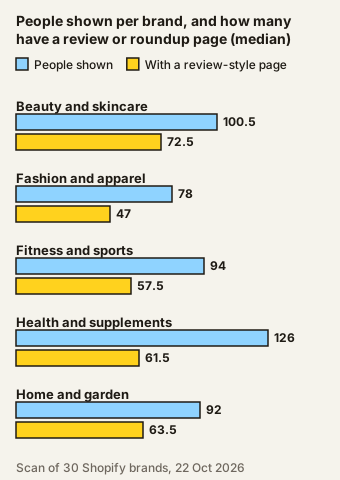
We ran RecruitAffiliates.ai's scanner on 30 Shopify brands. It looks for people who already promote each brand's rivals and topics. It counts who we could invite. It doesn't measure who is already in a program. It showed 2,924 people. Most of them, 1,877, had a review or roundup page as their strongest page. "Shown" means the people the scanner listed after it hid poor matches. In our title check, an AI model read 30 of those rows against their page titles. About 6 in 10 were clear fits, and 7 in 10 counting loose fits.
The scanner also flags coupon and deals sites. That flag is too rough to quote. In that check it marked an editorial roundup that mentioned deals, and the sample held no true coupon site to test it against. So we publish no coupon share.
The median is the halfway point: the average of the 3rd and 4th shops when ranked.
| Category (six shops each) | People shown, median (lowest to highest) | With a review or roundup page, median (lowest to highest) |
|---|---|---|
| Beauty and skincare | 100.5 (61 to 141) | 72.5 (44 to 124) |
| Fashion and apparel | 78 (49 to 101) | 47 (38 to 77) |
| Fitness and sports | 94 (60 to 106) | 57.5 (24 to 82) |
| Health and supplements | 126 (55 to 188) | 61.5 (40 to 104) |
| Home and garden | 92 (35 to 160) | 63.5 (26 to 90) |
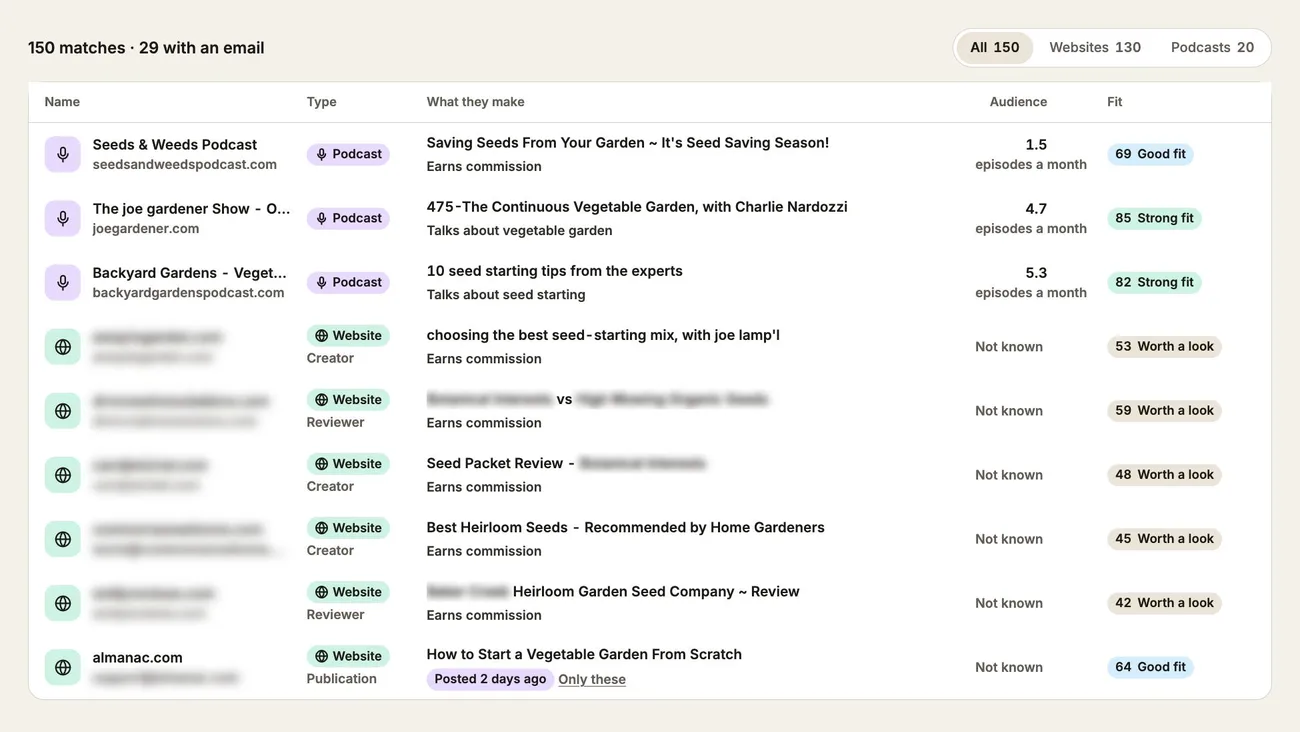
Treat these as leads to read, not a ready list. The label describes the page, not the publisher. In our 30-row check, about 8 of the 30 rows read were individual bloggers with one review post.
How we counted
The counts for each shop are in a CSV file. It names no brands. The full method and limits are on our Shopify affiliate scan page.
On 22 October 2026 we ran our scanner once on 30 public Shopify brands. There were six each in fashion, supplements, skincare, fitness and home. Half were UK and half US. We picked them by hand from our own cold outbound list, for fit with the category, with estimated sales of $25,000 to $250,000 a month (the list's own estimate, not checked). Each search covered websites, podcasts, TikTok creators and Instagram creators. The scanner found 5,537 people, and its own filter hid 2,613 of them. We counted the 2,924 it showed.
The limits
Read these before you quote any figure:
- One run, one day. Each shop was searched once, on 22 October 2026.
- A small, hand-picked sample. Medians over six shops are rough.
- Not tuned for each shop. Every search used our own account's offer and countries (the UK, Ireland, the US, Canada, Australia and New Zealand). We typed two rivals and three topics by hand for each shop.
- UK and US aren't comparable. The UK shops were smaller than the US ones.
- Emails are found, not checked. About a third of the people shown had one on record (916 of 2,924). Some are generic, such as info@. The product checks emails, but this scan skipped that step to save lookups, so we have no verified figure.
- A title check, not a full read. An AI model read 30 random shown rows against their page titles and addresses. It didn't open each page.
- What the check found. 19 of 30 clearly fit the brand's category and 2 fit loosely. 9 of 30 (30%) were not promoters, such as a broadcaster and a medical association.
- What to take from it. Treat about 6 in 10 of the people shown as clear fits, and 7 in 10 counting loose fits. With a sample of 30, it could be anywhere from 5 to 8 in 10.
Frequently asked questions
How do I stop coupon sites joining my affiliate program?
Turn off auto-approval in your affiliate app, and check each applicant's site before you approve them. Add a rule to your terms that bans coupon and deal sites. Then give each affiliate their own code, limited to one use per customer.
Should I ban coupon sites completely?
Not always. Some brands pay coupon and cashback sites on purpose. If you want them, give them their own codes so you can see what they bring in. What you want to avoid is letting them in by default.
How do I find out if my discount code has leaked?
Search Google for your brand name plus "coupon" or "promo code" once a month. If an affiliate's code shows up, ask them to get it removed or swap their code. Single-use codes make a copied code useless.
Can I turn off auto-approval in Shopify Collabs?
Collabs works a little differently. Our Shopify Collabs guide covers it in full. An open access program lets eligible creators share your links without approval. If you want to vet each creator, use an invite program instead, and send an offer, save for later, or decline each applicant.
Do small brands need affiliate terms?
Yes. Terms are what let you remove an affiliate and void their commission when they break a rule. In the US and UK, regulators also expect brands to make sure affiliates say they're paid.
If your programme runs on Shopify Collabs, our Shopify Collabs guides cover its invite limit, the alternatives and how to find creators. The counts we quote come from our scan of 30 Shopify brands, with the method and limits.
Sources
All checked 22 October 2026.
- UpPromote, automatic approval
- UpPromote, marketplace listing
- UpPromote, fraud checks on new sign-ups
- UpPromote, registration form
- GoAffPro, turn off automatic approval
- GoAffPro, prevent unwanted registrations
- GoAffPro, coupon limits
- Social Snowball, manually approve sign-up form applicants
- Social Snowball, protecting against fraud
- Refersion, automatically approve affiliate applications
- Refersion, the Refersion Marketplace
- Refersion, affiliate fraud
- Refersion, coupon code abuse
- Refersion, blocking specific coupon codes
- Shopify Help Center, recruiting creators in Collabs
- Shopify Help Center, Collabs programs
- Shopify Help Center, discount usage limits and end dates
- FTC, Endorsement Guides: What People Are Asking
- ASA, online affiliate marketing
- Performance Marketing Association, Beyond the Affiliate Coupon Code
- CMA, social media endorsements guidance for brands
- Shopify App Store reviews (quotes above): UpPromote, Shopify Collabs, GoAffPro