
How to find a YouTuber's email for a brand deal
A YouTuber's business email can sit in one of four places. The first is the About tab, behind a button called View email address. The others are the channel description, a website or link page the channel points to, and that site's contact page. Check them in that order. If none shows an address, skip the channel.
An affiliate is someone with an audience who sends buyers your way for a cut of each sale. That cut is the commission. This page covers the one step that follows finding the channel: getting a real address to write to. To find the channels first, read how to find YouTube affiliates.
Where does a YouTuber put a business email?
Creators choose where to put it, so no single spot works every time. The table lists the four places in the order we'd check them. The order and the "what to know" column are our own advice, not a YouTube rule.
| Place | Where to look | What to know |
|---|---|---|
| About tab | The channel's About section, then View email address | Shows only if the creator added one |
| Channel description | The About text and the links list | Can be a "business:" line or a booking link |
| Linked website or link page | Any site or link-in-bio page on the channel | Look for Contact, Partnerships or Work With Me |
| Contact page | The site's footer or menu | Can be a shared inbox, not the creator's own |
Setups differ. Some creators add only an email in YouTube. Others may list a manager or a form instead.
How does the About tab button work?
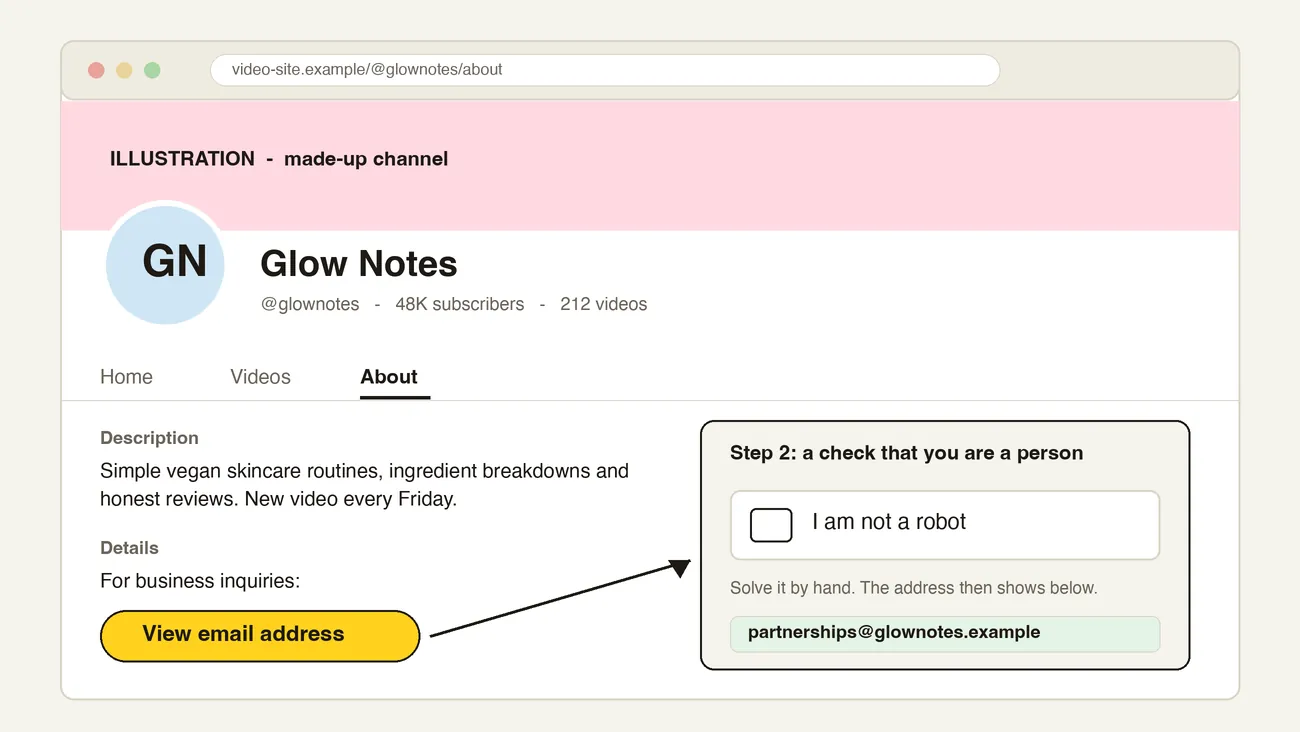
Open the channel, go to the About section and select View email address. YouTube's help page says you can only view the address if the channel owner has provided one (YouTube Help, checked 28 October 2026). If the button isn't there, the creator hasn't added one.
On the creator side, the owner adds it in YouTube Studio. They open Customization, then Profile, enter an email under Contact info and publish (YouTube Help, checked 28 October 2026). YouTube's page says this is for people who want to reach them about business questions.
If YouTube asks you to prove you are a person, do it by hand. Don't try to skip it.
What if the About tab shows nothing?
Move down the list.
- Read the channel description. Some creators add a line such as "business: name@brand.com" or a link to a booking form.
- Open the links on the channel. YouTube lets a creator show up to 14 links on the Home tab. The first sits near the subscribe button (YouTube Help, checked 28 October 2026). Some point to a personal site or a link page.
- Check that site's contact page. Look for Contact, Partnerships or Work With Me. Some creators list a manager's address here.
- Look at the creator's other profiles. An Instagram or TikTok bio can carry an email. See finding influencers on Instagram and finding TikTok creators.
Here is a made-up example. Say you sell vegan skincare and find a fictional channel, Glow Notes. Its About section has no email button. The description links to a site, and that site's contact page lists a partnerships address. You note the source and write to that address.
Write down where you found each address. It helps in your first line, and it shows you didn't guess. Never invent an address from a pattern like first.last@. A wrong guess lands in a stranger's inbox. Our guide to getting a creator's email says the same.
If you find only a form, use the form. If you find nothing, move on.
Why not use a scraper?
Search results show tools that promise bulk YouTube emails. We can't vouch for how any of them gets its data.
YouTube's terms are clear on one point. They ban "any automated means (such as robots, botnets or scrapers)", with exceptions that include YouTube's written permission. Source: YouTube Terms of Service, dated 17 March 2025, checked 28 October 2026. We aren't lawyers, and the terms have more detail, so read them before you use any tool that reads YouTube pages.
The by-hand route reads only what a creator chose to publish, one channel at a time. For a list of 20, that's an afternoon. That time is our rough estimate, not a measured figure.
What does our data show about YouTube?
In our 24 October 2026 follow-up on 3 Shopify shops, 1,440 of the 2,022 people shown (71%) came from YouTube (the follow-up). It counted people shown, so it says nothing about how many had an email found (scan limits).
What do I do once I have the address?
Check the address first. A verified email from RecruitAffiliates.ai has been checked for you. Otherwise send to the address and watch for a bounce, which is a returned message that tells you it didn't arrive. Then write one short, personal email. Name a video, say what you make, state the deal and ask one small thing. The affiliate recruitment email guide covers the method, and the influencer outreach email template gives wording to copy.
Send from your own inbox, a few a day. Send the follow-ups in the affiliate recruitment email guide, then stop. If the address came from a shared inbox, say who you want to reach.
In the US, a creator who gets paid or free product should disclose it. The FTC's guide for influencers says so (FTC, Disclosures 101, November 2019, checked 28 October 2026). Put a disclosure line in your terms. This is US guidance, not legal advice.
Where RecruitAffiliates.ai fits
RecruitAffiliates.ai reads your website and finds the people already covering shops like yours, including YouTube channels. Each one comes with the page that shows it, so you can judge the fit.
It looks for each person's email and checks what it finds, so you get a verified email. AI drafts a personal first email. You approve it, and it sends from your own inbox. It doesn't message anyone on YouTube for you. The Shopify page has the five steps.
Launch is $79 a month for one brand, with a 7-day free trial and no card.
Frequently asked questions
How do I find a YouTuber's email?
Open the channel's About section and select View email address. If it isn't there, read the channel description, follow the links to a website and look for a contact page. YouTube says the address shows only if the owner provided one.
Does YouTube use a captcha?
YouTube's help page doesn't say, so we can't confirm it. If you see a check that you are a person, answer it by hand.
Can I guess a creator's email address?
Don't. A guess can reach the wrong person, and it looks careless. Use an address the creator has published, or use their contact form.
Is it allowed to scrape YouTube for emails?
YouTube's terms ban using automated means such as scrapers to access the service, unless YouTube gives written permission or a listed exception applies. Check the terms and take advice before you use any tool that reads YouTube pages in bulk.
What share of YouTube channels have an email?
We don't know. We did not measure it. Our 24 October 2026 follow-up on 3 Shopify shops shows where people were found, not how many had an email.