
Instagram email finder: how to get a creator's email from their profile
When a creator publishes an email, it is in one of five places, and checking them costs nothing. This guide gives the order, a worked example, the US and UK email rules and what our scan found.
The five places are the Contact or Email button, the bio text, the link-in-bio page, the contact page of any site it links to, and the Tagged tab. It lists posts where others tagged the creator. If none shows an address, use a contact form. Or send a direct message (DM), a private note inside the app.
A link-in-bio page is one web page that holds all of a creator's links. A creator here means anyone with an audience who might promote your brand for a cut of each sale. That cut is a commission. This guide covers getting the address. To find the accounts first, read how to find influencers on Instagram.
How many people did our scan find through Instagram?
On 22 October 2026 we ran RecruitAffiliates.ai's normal first search for 30 public Shopify brands. Six brands sat in each of five categories. It showed 2,924 people. In this guide, "people" means everyone the search showed, whether a creator or a publisher. The method and limits have the detail.
Instagram gave 17 of those people. TikTok gave 49. Each person is counted once, under the page type that shows them best. Even so, an email was found for 916 of the 2,924 (31%). Say all 66 had an email found. Then at least 850 of the 916 still belonged to people found through other web pages, such as review pages, blogs and podcasts.
| Store type (totals across six stores each; the method page shows the median store) | People shown | TikTok | Email found | Email found, share | |
|---|---|---|---|---|---|
| Fashion and apparel | 457 | 9 | 38 | 173 | 38% |
| Beauty and skincare | 620 | 5 | 7 | 215 | 35% |
| Health and supplements | 715 | 1 | 0 | 211 | 30% |
| Home and garden | 608 | 1 | 2 | 178 | 29% |
| Fitness and sports | 524 | 1 | 2 | 139 | 27% |
| All 30 stores | 2,924 | 17 | 49 | 916 | 31% |
Each category has its own report:
The totals come from the scan data.
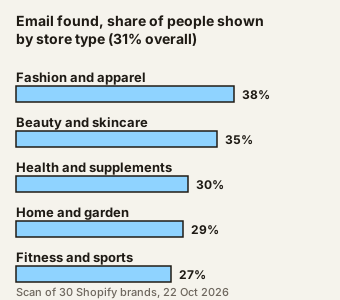
Across the 30 Shopify stores, the median (the middle value when you line them up) was 30 people with an email found per store, from 5 to 53. These are emails found. The scan ran no email checks, so it says nothing about how many work. In a 30-row check, about 3 in 10 shown people were not promoters, so the 31% counts them too.
Read the limits before you quote this. Instagram is a floor, not a total. One brand's Instagram search ran out of time, and Instagram data comes mostly from a lookup service. It was one run on one day, on a hand-picked sample. The scan searches the open web, so it probably finds people on websites more easily than people on apps. It also had no YouTube pass. The counts do not say where each email was found. So we do not claim Instagram is weak. We claim only that few of the people our search showed were found through Instagram.
Our advice, not a finding: the quickest route to a creator's address often runs through their website or link-in-bio page. Check those before you give up on the app.
Where does a creator's email hide?
Creators choose where to put it, so no single spot works every time. We have not measured how often each place holds an address, so we give no percentages. The table lists the places in the order we would check them. The order and the time are our own advice.
| Where it hides | How to check in under a minute | If it is not there |
|---|---|---|
| Contact or Email button | Open the profile and tap Contact or Email under the bio | Go to the bio text |
| Bio text | Read the bio for a line such as "collabs: name@site.com" | Go to the bio link |
| Link-in-bio page | Tap the bio link and look for Contact, Partnerships or Work With Me | Follow any site it links to |
| Linked site's contact page | Scroll to the footer or menu and open Contact | Check tagged posts |
| Tagged posts | Open the Tagged tab and note any manager or agency account | Send a message or a form |
Some creators list a manager or a shared inbox instead of their own address. That is fine. Write down which it is.
How does the Contact button work?
Instagram's help page says a professional account (a Business or Creator account) can add a Contact button near the top of the profile. It can hold directions, a phone number and an email address. When the creator turns it on, anyone who taps Contact can see the details (Instagram Help, about professional accounts, checked 28 October 2026).
Instagram says Creator accounts suit public figures, content producers and influencers, and Business accounts suit brands and retailers. If a profile shows no Contact button, the creator may not have switched one on. Menu names change by app version, so look for the closest match on your phone.
What does the check look like on one account?
Take one creator at a time. This is a worked example with a made-up account, @glownotes, which sells nothing and does not exist.
- Tap Contact. @glownotes shows no button, so move on.
- Read the bio. It says "skincare notes, UK" and nothing else.
- Open the link-in-bio page. It lists a blog, a shop and a Partnerships link.
- Open the Partnerships link. It is a contact form with a line saying "brand enquiries welcome".
- Open the Tagged tab. It shows fans, not a manager, so there is nothing more to find.
Use the form: name a post, say who you are and state the deal.
Note where each address came from, in your sheet. Our Instagram search guide shows the columns. Never invent an address from a pattern like first.last@. A wrong guess lands in a stranger's inbox.
If you find a form, use it first. If you find nothing at all, a DM is a fair move. Our guide to recruiting affiliates on Instagram covers when a DM beats an email.
When is a finder tool faster?
By hand, a profile with a button or link takes about a minute. One that needs all five places takes about five (our rough estimates, not measured). At five minutes each, 20 creators is under two hours and 200 is about 17 hours.
A tool is faster when your list is long. It also helps when your creators live on websites and podcasts, as well as Instagram. A tool saves the opening of five places per person. It cannot make an address exist.
Know the limits before you pay for one:
- Coverage varies. A tool returns only what it can reach. Many creators publish nothing.
- Accuracy varies. We can't vouch for how any finder gets or checks its data. Ask for a free sample and test ten names by hand.
- Methods vary. Some read Instagram in bulk, which can break its rules. See the next section.
RecruitAffiliates.ai works from the other end. It reads your website and finds the people already covering brands like yours. Each comes with the page that shows why it fits. It looks for each person's email and checks what it finds, so you get a verified email. In our scan, Instagram creators were a small part of what the search showed. To see the kind of pages a search returns for your own site, try the free competitor affiliate checker.
What should you not do on Instagram?
Do not scrape it. Instagram's help page defines data scraping as the automated access and collection of data from a website or app. It says its Terms of Use do not allow collecting information in unauthorised ways. It also says it has teams that detect and block scraping, and that accounts can be restricted (Instagram Help, data scraping, checked 28 October 2026).
Reading a profile by hand is not scraping. A tool that logs in and pulls many profiles may be. We are not lawyers, and the terms have more detail. Read them before you use any tool that touches Instagram.
Do not guess addresses. Do not buy a list of "Instagram emails" you cannot trace to a source. And do not use someone else's Instagram login.
What do the email rules say?
This is a plain summary of two public sources. It is not legal advice. Data protection law also applies.
In the US, CAN-SPAM is the law on commercial email. The Federal Trade Commission (FTC) guide to it says the law "makes no exception for business-to-business email". You can send without the recipient's consent first, if you follow the rules. Use true sender details and an honest subject line. Say the message is an ad. Add your postal address and a clear way to opt out. Honour an opt-out within 10 business days (FTC, CAN-SPAM compliance guide, checked 28 October 2026).
In the UK, the Information Commissioner's Office (ICO) is the data regulator. It says the rule on marketing by email does not apply to corporate subscribers, such as companies. Sole traders, meaning people who are self-employed under their own name, and some partnerships count as individuals. For them you need consent or the narrow "soft opt-in", which covers people you already sold to. If you can't tell which a contact is, the ICO says treat them as an individual (ICO, business-to-business marketing, checked 28 October 2026).
Some creators work as sole traders. So for UK-based creators, ask a lawyer before you cold email. A form that invites brand enquiries is not a bought list. But we can't say it settles the rule.
Google's sender rules for Gmail addresses say to keep the spam rate below 0.10% in Postmaster Tools, Google's free dashboard of how Gmail sees your mail, and never reach 0.30% (Google, email sender guidelines, checked 28 October 2026). A few emails a day is too few to measure. So write only to people who fit, and send from your own inbox.
How do you write to them?
Open with the post you saw. Say what you make, state the deal and ask one small thing. The influencer outreach email template has wording to copy, and the affiliate recruitment email guide covers follow-ups. For the YouTube version of this guide, see where YouTubers put their email.
If you ask for a post in return for free product or a commission, ask them to say so. The FTC says a free product or payment is a material connection to disclose (FTC, Disclosures 101, checked 28 October 2026).
Where RecruitAffiliates.ai fits
Enter your website and RecruitAffiliates.ai finds the people already covering brands like yours: review sites, blogs, podcasts, YouTube channels, and Instagram and TikTok creators. It looks up each person's email and checks it. AI drafts a personal first email. You approve it, and it sends from your own inbox. It doesn't message anyone on Instagram for you. The Shopify page has the five steps.
Launch is $79 a month for one brand, with a 7-day free trial and no card.
Frequently asked questions
How do I find someone's email on Instagram?
Tap the Contact or Email button on their profile. Then read the bio, open the link-in-bio page and check the contact page of any site it links to. Instagram shows the Contact button only if a professional account owner turned it on. If you find none, send a direct message.
Is it legal to email an influencer from their bio?
In the US, CAN-SPAM allows business email without prior consent if you follow its rules, including an opt-out. In the UK, consent rules differ for companies and sole traders. This is a summary, not legal advice, so take advice for your case.
Are Instagram email finders accurate?
We can't say. Accuracy depends on the tool and on what each creator has published. We did not test any finder for this guide. Ask for a free sample and check ten names by hand before you buy.
What is the best free Instagram email finder?
Your own eyes, for a short list: the Contact button, the bio and the link-in-bio page cost nothing. For a longer list, the free competitor affiliate checker shows who promotes your rivals. The 7-day free trial looks up their emails.
Sources
- Our scan: method, counts and limits, 22 October 2026
- Instagram Help, about professional accounts, checked 28 October 2026
- Instagram Help, data scraping, checked 28 October 2026
- FTC, CAN-SPAM Act compliance guide for business, checked 28 October 2026
- ICO, business-to-business marketing, checked 28 October 2026
- Google, email sender guidelines, checked 28 October 2026
- FTC, Disclosures 101 for Social Media Influencers, checked 28 October 2026